Sounding analysis, rebuilt for current Python.

A standalone fork of SHARPpy that keeps the SPC-style Skew-T, hodograph, hazard, and derived-parameter views, and rebuilds everything around them: Qt6 rendering, a Rust-primary numerical backend, thirteen public forecast models, and reproducible point- and area-sounding tooling.

SHARPpy-Reimagined-v1.1.0-windows-x64.zip
184.1 MB · no Python required · unsigned build, verify the download

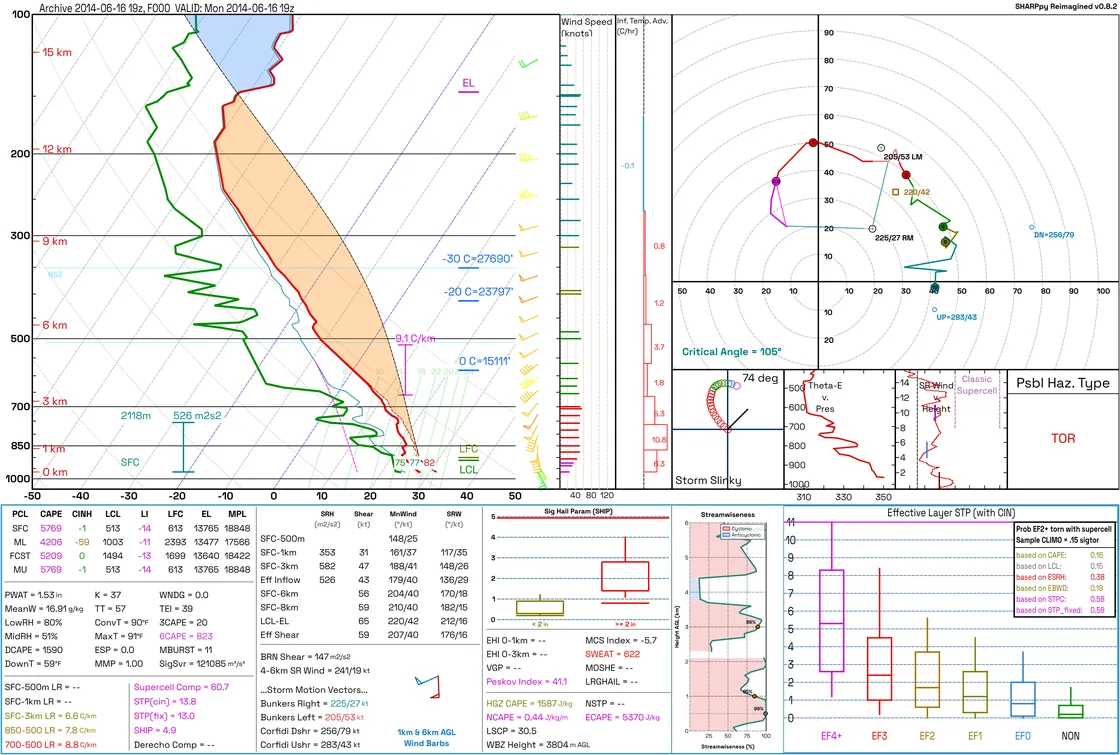
The SHARPpy Reimagined sounding window: Skew-T, hodograph, hazard panel, and derived-parameter insets
OAX 2014-06-16 19Z — observed radiosonde, rendered in the Inverted (light) palette. HRRR 36.68°N 95.66°W F018 — forecast point, rendered in the Standard (dark) palette.

What it does

The familiar analysis, with the data plumbing actually finished.

The scientific canvas is deliberately conservative — its geometry and colours are shared byte-for-byte with the headless PNG renderer. The work went into everything around it: where profiles come from, how fast they decode, and whether the result is reproducible.

6Sounding sources

Observed, forecast, reanalysis, or file

Radiosondes from the University of Wyoming, IEM RAOB, and NOAA IGRA v2 archives, point soundings from thirteen public models, ERA5 reanalysis, and local .npz, SPC, BUFKIT, PECAN, or WRF-ARW files.

13Forecast models

Every level the provider publishes

Each extraction requires a verified surface row — true surface pressure and terrain height, 2 m thermodynamics, 10 m wind. A model that cannot supply it fails loudly rather than returning a pressure-only profile.

3Canvas palettes

Standard, Inverted, Protanopia

Inverted is a complete light theme, not an inversion filter. The application chrome follows the canvas palette, and every text and control-boundary pair is checked against its WCAG AA threshold by the test suite.

RustPrimary backend

With a real Python fallback

Official Windows builds bundle the native extension for kinematics, parcel ascents, DCAPE, and direct GRIB point decoding. Source installs need no Rust toolchain — the optimized Python path stays fully functional.

20–400%Viewer zoom

Zoom, pan, sidebar, full screen

Ctrl+wheel zooms about the cursor, middle-drag pans, and a toolbar carries fit, actual size, and stepped zoom. Precision trackpad gestures are translated, so laptops behave like mice.

72 hTimeline queue

Sessions and reproducibility

Queue a forecast range into one viewer with playback controls, then save every loaded sounding, edit, and parcel choice to a portable .sharpmod-session file that executes no code.
Data sources

Five ways into the Sounding Picker.

Two work offline out of the box. The rest need the GRIB extras, and ERA5 additionally needs a free Copernicus account.

  • Station Map Every UWyo radiosonde station over a coastline-and-lakes basemap. Click to select, double-click to open; scroll to zoom, drag to pan, and narrow by region. Choose UWyo, IEM RAOB, or NOAA IGRA v2 before fetching the profile. Bundled offline catalog
  • Station List The full catalogue with live filtering by station id or name, the same three-hourly UTC observation times, and the same observed-archive selector. Bundled offline catalog
  • Forecast Model Click a point or type coordinates, then choose a model, UTC run, forecast hour, and optional ensemble member. Inventory is checked in the background; if publication lags, the picker offers the newest available earlier cycle instead of silently changing your selection. Requires [era5] extras
  • Reanalysis (ERA5) Any global point and hourly UTC analysis, with a preview of the snapped 0.25° grid point. Retrieves all 37 pressure levels plus a colocated surface record, and caches completed point-hours. Requires [era5] extras and a free CDS account
  • Open File A local .npz, SPC tabular, BUFKIT, PECAN, or WRF-ARW text sounding — or drag the file onto the window. Raw wrfout NetCDF is inspected and validated against the actual curvilinear grid before extraction. Raw wrfout requires [wrf]

Forecast models

Thirteen products, each confirmed end to end.

Every product below was verified against live data to return a sounding with a merged verified surface row. Remote run availability still depends on the upstream provider; model-extract --list is the runtime source of truth.

Key Model Coverage Configured forecast hours
hrrr HRRR pressure levels CONUS 00/06/12/18Z F000–F048 hourly; other cycles F000–F018
rap RAP 13 km AWIPS pressure levels CONUS F000–F051 hourly
nam NAM 12 km pressure levels CONUS F000–F084 every 3 h
nam-3km-conus NAM 3 km CONUS nest CONUS F000–F060 hourly
hrw-wrf-arw NOAA HiResW WRF-ARW 5 km CONUS F000–F048 hourly · 00/12Z only
hrw-fv3 NOAA HiResW FV3 5 km CONUS F000–F048 hourly · 00/12Z only
gfs GFS 0.25° pressure levels Global F000–F120 hourly, then every 3 h to F384
cfs CFS 6-hourly pressure levels Global F000–F384 every 6 h
ecmwf-ifs ECMWF IFS Open Data Global 00/12Z F000–F144 every 3 h, then every 6 h to F360; 06/18Z stops at F144
ecmwf-aifs ECMWF-AIFS Open Data Global F000–F360 every 6 h
gefs GEFS 0.5° pressure levels Global F000–F384 every 3 h · control member c00
gdps Canadian GDPS 15 km point profile Global F000–F240 every 3 h · 00/12Z
rdps Canadian RDPS 10 km point profile North America / Arctic F000–F084 hourly

Two further products stay withheld rather than offered and then refused: rrfs-a publishes pressure levels with no surface, 2 m, or 10 m records, and aigfs is missing surface pressure, terrain height, and 2 m moisture from every product it publishes. Both are a one-field change to restore if NOAA starts publishing the fields.

Getting started

Download, load one sounding, analyse it.

The Windows build needs no Python and no configuration for observed soundings. The first complete profile is the whole onboarding.

  1. Unpack and run

    Extract the ZIP and launch SHARPpy-Reimagined.exe. The one-folder build bundles Python 3.11 and the Rust backend, and starts substantially faster than the single-file portable option.

  2. Pick a source

    The Sounding Picker opens on the Station Map. Set the observation time, double-click a station, and the profile opens — no account, no key, no network configuration.

  3. Interrogate and export

    Right-click the Skew-T for the readout cursor, parcel lifting, and Modify Surface. Drag temperature, dewpoint, or wind points to edit the profile and every index recalculates live.

    F1
    Full interaction guide
    Ctrl+B
    Sounding panel
    Ctrl+0
    Fit to window
    Ctrl+1
    Actual size
    Ctrl+E
    Export HD PNG
    Ctrl+Z
    Undo a profile edit
    Step through time
    F11
    Full screen
    W
    Back to the picker

Command line

Scriptable, without opening the GUI.

Every source has a command-line entry point, and rendering is fully headless — the same palette and canvas as the desktop application.

Command Purpose
sharpmod-render Render a sounding file to PNG
uwyo-sounding List, search, and fetch UWyo soundings
observed-sounding UWyo, IEM RAOB, or NOAA IGRA v2 observed profiles
model-extract All pressure levels for a model point
model-batch-extract Resumable multi-point, multi-hour jobs
box-extract Sample an area and export parameter fields
era5-extract ERA5 point sounding to .npz
wrf-extract WRF-ARW point sounding to .npz
sharpmod-rust-sync Check, rebuild, and verify the Rust backend

Install from source

Requires Python 3.11, 3.12, or 3.13. The installer hash-verifies the official upstream SHARPpy wheel, corrects only its obsolete NumPy pin, records that provenance, and requires pip check to pass.

# install, then render the bundled example
python scripts/install_sharppy_compat.py
sharpmod-render examples/soundings/hrrr_point_36.68N_95.66W_f018.npz out.png

# observed sounding: UWyo, then the IEM RAOB archive
observed-sounding fetch 72357 "2024-05-20 00" --out oun.npz --render oun.png

# a forecast point, with the GRIB extras installed
model-extract hrrr 35.18 -97.44 --fxx 0 --render hrrr_oun.png

Full setup reference in installation.txt, recipes and Python API examples in the field guide.

Release v1.1.0

Read the environment before choosing the sounding.

Version 1.1.0 builds the mesoanalysis around the Skew-T: map the airmass, radar, and outlook together, then open a point or sample the whole area that matters.

  • Twenty-three native HRRR fields. Paint pattern, surface, convection, instability, kinematic, or composite fields beneath radar and the SPC outlook. The field and forecast hour follow a sounding into its locator inset without a second download.
  • Area soundings. Shift-drag a box to sample the model's actual grid in one transfer, then average the airmass correctly as wind components and mixing ratio or open the sample as a parameter-field workspace.
  • Fields through space and time. Map fast and SPC-composite parameters, apply seven ingredient screens, step the same box through forecast hours, jump to its peak, and export PNG, CSV, or cell-polygon GeoJSON.
  • Radar and maps you can choose. Select any of 155 WSR-88D sites or the CONUS mosaic, and switch every map between a flat view and Lambert conformal projection. Lake shorelines and land-clipped political boundaries now ship with both.
  • More on the sounding itself. Freezing and wet-bulb-zero levels are always on the Skew-T; fire adds ventilation rate; winter adds Kuchera ratio and dendritic-growth pressure; and every panel is named in the menu.
  • Deep observed history through NOAA IGRA v2. Search roughly 2,900 quality-assured global radiosonde stations alongside UWyo and IEM, with bounded station-archive downloads and an on-disk cache.

Read the full changelog

Get the current Windows build.

One folder, no installer, no Python. Extract it anywhere and run the executable.

Release
v1.1.0 6 September 2026
Platform
Windows x64Bundles Python 3.11 and the Rust backend
Source
Python 3.11, 3.12, or 3.13Qt6 / PySide6, Rust optional
Licence
BSD-3-Clause A fork of the abandoned upstream SHARPpy project

Verifying a download

The executables are not code-signed.

Expect a SmartScreen warning on first run

Because the binaries carry no code-signing certificate, Windows may warn the first time you launch one. Choosing More info → Run anyway is expected.

Two things are published with every release so a download can still be checked independently: a SHA-256 manifest, and GitHub build provenance that ties the artifact to the workflow run and commit that produced it.

Download the SHA256SUMS manifest

# compare against the published manifest
Get-FileHash .\SHARPpy-Reimagined-v1.1.0-windows-x64.zip `
  -Algorithm SHA256

# tie the artifact to the workflow run that built it
gh attestation verify .\SHARPpy-Reimagined-v1.1.0-windows-x64.zip `
  --repo ShianMike/SHARPpy-Reimagined